
Shared Hosting vs VPS vs Dedicated Server A Complete Technical Comparison
Dec 13, 2025 12:46:37 PM Gulshan Kumar 21 min read
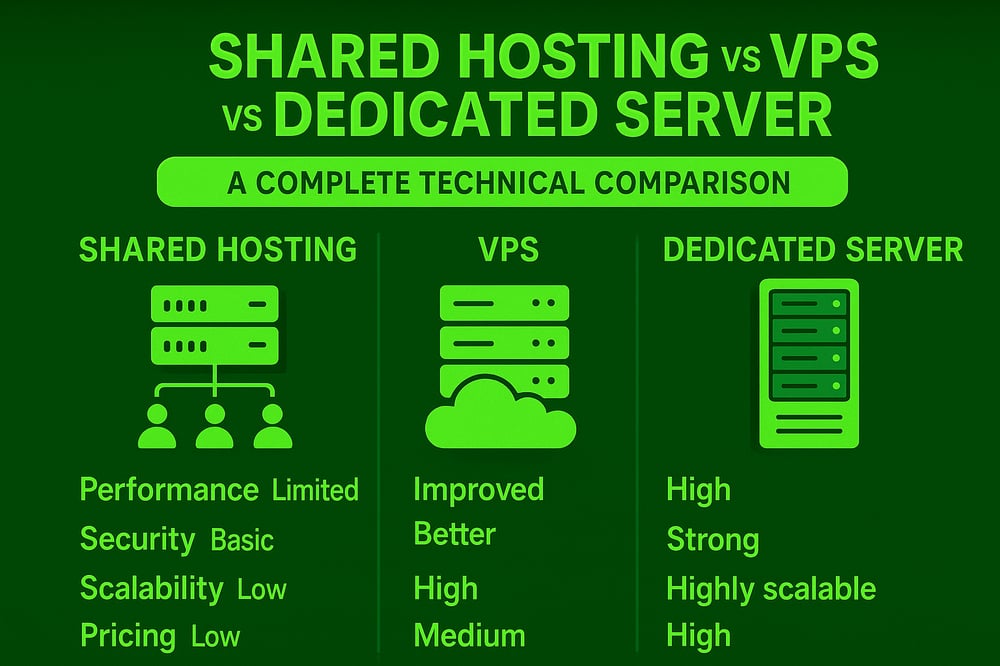
Choosing the right hosting type is one of the most critical infrastructure decisions for any website or application. Shared hosting, VPS, and dedicated servers may appear similar on the surface, but they differ significantly in architecture, resource allocation, isolation, performance consistency, and scalability.
As a system administrator, I frequently encounter performance, security, and reliability issues caused not by poor code, but by selecting the wrong hosting model. This comprehensive guide breaks down the real technical differences to help you make an informed decision.
Quick Insight: Understanding these fundamental differences will save you from costly migrations and performance bottlenecks down the road. Whether you're launching a startup or scaling an established platform, this guide provides the technical clarity you need.
1. Architecture Differences
Shared Hosting Architecture
In shared hosting environments, hundreds or even thousands of websites operate on a single physical server under the same operating system instance.
How it works:
- Single Linux OS instance
- One unified web server stack (Apache/Nginx, PHP, MySQL)
- All users share CPU, RAM, disk I/O, and network interfaces
- Hosting control panel enforces basic resource limits
Most shared hosting environments implement process-level restrictions such as suPHP, mod_ruid2, or CloudLinux LVE to prevent one account from completely exhausting server resources—but isolation remains fundamentally limited.
Best suited for:
- Static websites and landing pages
- Personal blogs with minimal traffic
- Small business websites
- Testing and development environments
Perfect Shared Hosting Solution
HostGraber Shared Hosting provides optimized shared hosting with CloudLinux isolation, LiteSpeed web server, and 24/7 technical support—ideal for websites that need reliability without the complexity of server management.
Explore Shared Hosting PlansVPS (Virtual Private Server) Architecture
A VPS leverages virtualization technology to partition a physical server into multiple isolated virtual machines, each functioning as an independent server.
How it works:
- Hypervisor (KVM, VMware, Hyper-V) manages virtualization layer
- Each VPS operates with its own kernel, OS, and dedicated resources
- CPU, RAM, and storage are reserved or fairly scheduled
- Full root/administrator access for complete control
- Isolated network stack and security context
This architecture provides the optimal balance between cost-effectiveness and administrative control, making it the preferred choice for growing businesses and developers.
Best suited for:
- Growing websites with increasing traffic demands
- SaaS applications requiring custom configurations
- E-commerce stores (WooCommerce, Magento)
- Developers needing custom server stacks and tools
- Multiple websites under single management
Premium VPS Hosting
HostGraber VPS Hosting delivers enterprise-grade KVM virtualization with guaranteed resources, NVMe SSD storage, and full root access. Scale seamlessly as your business grows with instant resource upgrades.
Explore VPS PlansDedicated Server Architecture
A dedicated server provides exclusive access to an entire physical machine, delivering maximum performance and control.
How it works:
- Single tenant per physical server
- Complete hardware-level access and control
- Zero hypervisor overhead (unless self-configured)
- Maximum performance predictability and consistency
- Customizable hardware configurations
Best suited for:
- High-traffic enterprise platforms
- Large-scale e-commerce operations
- Mission-critical business applications
- Database-intensive workloads
- Compliance-heavy industries (healthcare, finance)
Enterprise Dedicated Servers
HostGraber Dedicated Servers offer bare-metal performance with enterprise hardware, RAID configurations, and optional managed services. Perfect for applications that demand absolute performance and control.
View Dedicated Server Options2. Resource Isolation Compared
Shared Hosting Isolation
- CPU: Shared across all accounts with soft limits
- RAM: Common memory pool with potential contention
- Disk I/O: Heavily affected by "noisy neighbors"
- Kernel: Single shared kernel instance
- Network: Shared bandwidth and IP resources
Critical Limitation: Any resource spike from another account can directly impact your website's performance. Even with CloudLinux protection, isolation is constrained by the shared kernel architecture.
VPS Resource Isolation
- CPU: Dedicated cores or guaranteed CPU time allocation
- RAM: Reserved memory with no sharing
- Disk I/O: Enforced limits at hypervisor level
- Kernel: Completely separate kernel space
- Network: Isolated network stack with dedicated IPs
Key Advantage: This strong isolation dramatically reduces the "noisy neighbor" problem, ensuring consistent performance regardless of other VPS activities on the same physical host.
Dedicated Server Isolation
- Hardware: 100% exclusive physical access
- Resources: Absolute hardware-level isolation
- Contention: Zero resource competition
- Security: Complete physical and logical isolation
Security and performance isolation are absolute—making dedicated servers the gold standard for enterprise deployments.
3. Performance Consistency Analysis
| Hosting Type | Performance Stability | Load Handling |
|---|---|---|
| Shared Hosting | Variable & Unpredictable | Limited by shared resources |
| VPS Hosting | Consistent & Reliable | Handles moderate to high loads |
| Dedicated Server | Predictable & Maximum | Handles enterprise-scale loads |
Performance Breakdown:
- Shared Hosting: Performance fluctuates heavily based on server load and neighbor activity
- VPS Hosting: Maintains stable performance under normal operational loads
- Dedicated Servers: Delivers full performance headroom with zero degradation
4. Security Considerations
Shared Hosting Security
- Shared kernel increases overall attack surface
- One compromised account may potentially affect neighboring sites
- Limited firewall and security configuration control
- Relies on hosting provider's security measures
- Basic SSL/TLS support
VPS Security
- Kernel-level isolation significantly enhances security posture
- Complete control over firewall rules (iptables/UFW)
- Custom SSH configurations and port management
- Ability to implement custom security policies
- Easier compliance management (PCI-DSS, HIPAA, GDPR)
- Root access for security tool installation
Dedicated Server Security
- Maximum security control at hardware and software levels
- Suitable for compliance-heavy workloads
- Ideal for processing sensitive or regulated data
- Custom hardware security modules (HSM) support
- Physical security options available in data centers
Security-First Hosting Infrastructure
All HostGraber hosting solutions include DDoS protection, automated malware scanning, free SSL certificates, and regular security updates to keep your infrastructure protected 24/7.
5. Scalability and Flexibility
Shared Hosting Scalability
- Minimal vertical scalability within plan limits
- Upgrade path typically limited to higher-tier shared plans
- No horizontal scaling options
- Migration to VPS required for significant growth
VPS Scalability
- Vertical Scaling: Easy RAM and CPU core upgrades
- Storage Expansion: Simple disk space additions
- Snapshot Support: Quick backup and restore capabilities
- Migration: Seamless movement between VPS tiers
- Load Balancing: Can be configured for horizontal scaling
Pro Tip: HostGraber VPS plans allow instant resource upgrades without server migration or downtime—perfect for handling traffic spikes and growth.
Dedicated Server Scalability
- Hardware upgrades require scheduled maintenance windows
- Horizontal scaling requires architectural planning and load balancers
- Most flexible for custom infrastructure designs
- Can implement multi-server clusters and CDN integration
6. When to Upgrade and Why
From Shared Hosting to VPS
Upgrade when you experience:
- CPU or memory limits frequently exceeded
- Slow backend performance and database queries
- Need for custom PHP, Node.js, or Python versions
- Traffic consistently exceeding basic plan limits
- Required custom software installations
- Need for enhanced security configurations
Benefits of upgrading:
- Dramatically improved stability and performance
- Full root access for complete server control
- Enhanced security isolation and customization
- Ability to install any compatible software
Ready to Upgrade?
Migrate from shared hosting to HostGraber VPS with our free migration service. Our technical team handles the entire process with zero downtime.
Get Started with VPSFrom VPS to Dedicated Server
Upgrade when you need:
- Resource-intensive applications consuming maximum VPS resources
- Very high concurrent user loads (1000+ simultaneous connections)
- Database-heavy workloads requiring maximum I/O performance
- Strict compliance requirements (SOC 2, HIPAA, PCI-DSS Level 1)
- Mission-critical applications requiring 99.99%+ uptime
Benefits of upgrading:
- Guaranteed dedicated hardware resources
- Elimination of virtualization overhead
- Enterprise-grade performance and reliability
- Custom hardware configurations available
7. Real-World Migration Case Study
E-Commerce Store Transformation
Initial Problem:
A WooCommerce-based online store was experiencing severe performance issues on shared hosting. Checkout processes took 8-12 seconds, cart abandonment rates exceeded 70%, and backend admin operations frequently timed out during peak hours.
Migration to VPS:
After migrating to a HostGraber VPS with dedicated resources, the store experienced:
- 87% reduction in page load times (2.1 seconds average)
- Checkout completion time decreased to under 3 seconds
- Cart abandonment dropped to 32%
- Backend operations became consistently responsive
Scaling to Dedicated Server:
As monthly traffic grew to 500,000+ visitors with heavy database operations and payment processing, the business upgraded to a dedicated server. This move eliminated all remaining performance constraints and supported the implementation of advanced caching, CDN integration, and redundant database systems.
8. Complete Comparison Table
| Feature | Shared Hosting | VPS Hosting | Dedicated Server |
|---|---|---|---|
| Resource Isolation | Low | Medium–High | Complete |
| Root Access | No | Yes | Yes |
| Performance | Unpredictable | Stable & Consistent | Maximum |
| Security Level | Basic | Strong | Enterprise-Grade |
| Scalability | Very Limited | Highly Flexible | Manual/Custom |
| Management Level | Fully Managed | Self or Managed Options | Self or Managed Options |
| Cost | Lowest ($3-15/mo) | Medium ($20-100/mo) | Highest ($100-500+/mo) |
| Best For | Small sites, blogs | Growing businesses, apps | Enterprise applications |
Frequently Asked Questions
When should I upgrade from shared hosting to VPS?
Upgrade when you consistently hit resource limits, need custom software installations, require better security isolation, or experience performance issues during normal traffic levels.
Is VPS hosting difficult to manage?
Not necessarily. Managed VPS options like HostGraber Managed VPS include server management, updates, and monitoring, making it as easy as shared hosting but with VPS benefits.
Can shared hosting handle e-commerce sites?
Small e-commerce sites with limited products and low traffic can run on shared hosting, but as you grow, VPS becomes essential for performance, security, and PCI compliance requirements.
What's the main advantage of dedicated servers over VPS?
Dedicated servers provide guaranteed hardware resources with zero virtualization overhead, absolute isolation, and the ability to handle enterprise-scale workloads with maximum predictability.
How much traffic can a VPS handle?
A properly configured VPS can handle anywhere from 10,000 to 500,000+ monthly visitors depending on resource allocation and application optimization. Most growing businesses find VPS sufficient for years.
Conclusion
There is no universally "best" hosting type—only the right infrastructure for your specific workload and growth stage. Shared hosting serves small sites effectively, VPS provides the ideal balance for growing platforms, and dedicated servers deliver enterprise-grade performance for mission-critical systems.
From a system administrator's perspective: upgrade before your infrastructure becomes the bottleneck. Performance problems are far cheaper to prevent than to fix under pressure. Reactive upgrades during traffic spikes or security incidents often result in rushed migrations, data loss risks, and extended downtime.
Pro Recommendation: Plan your hosting infrastructure 6-12 months ahead of your anticipated needs. This proactive approach ensures smooth scaling, proper testing, and zero-downtime migrations.
Choose the Right Hosting for Your Business
Whether you're starting small or scaling enterprise infrastructure, HostGraber provides reliable hosting solutions with expert support, free migrations, and 24/7 monitoring.
Shared Hosting VPS Hosting Dedicated ServersStart with the right foundation. Scale with confidence. Succeed with proper infrastructure.
Gulshan Kumar
Gulshan Kumar is a technology professional with hands-on experience in web hosting, server management, and digital infrastructure. With a strong understanding of hosting environments and performance optimization, Gulshan works closely with businesses to ensure their websites and applications remain fast, secure, and reliable. He regularly shares practical insights on web hosting solutions, server troubleshooting, and infrastructure best practices, helping entrepreneurs and IT teams make informed technical decisions. Passionate about problem-solving and emerging technologies, Gulshan focuses on delivering stable, scalable hosting solutions that support long-term business growth. When not working on servers or infrastructure projects, Gulshan enjoys exploring new hosting technologies and improving digital performance strategies to help businesses succeed online.